Guide brief
Quick answer
The real cost of an AI outbound automation stack is the sum of software, usage, sending infrastructure, and operating time. A vendor plan page can tell you one line item. It cannot tell you whether your motion needs 500 verified contacts a month, 5,000 enrichment runs, three sending mailboxes, or a RevOps owner checking data quality every Friday.
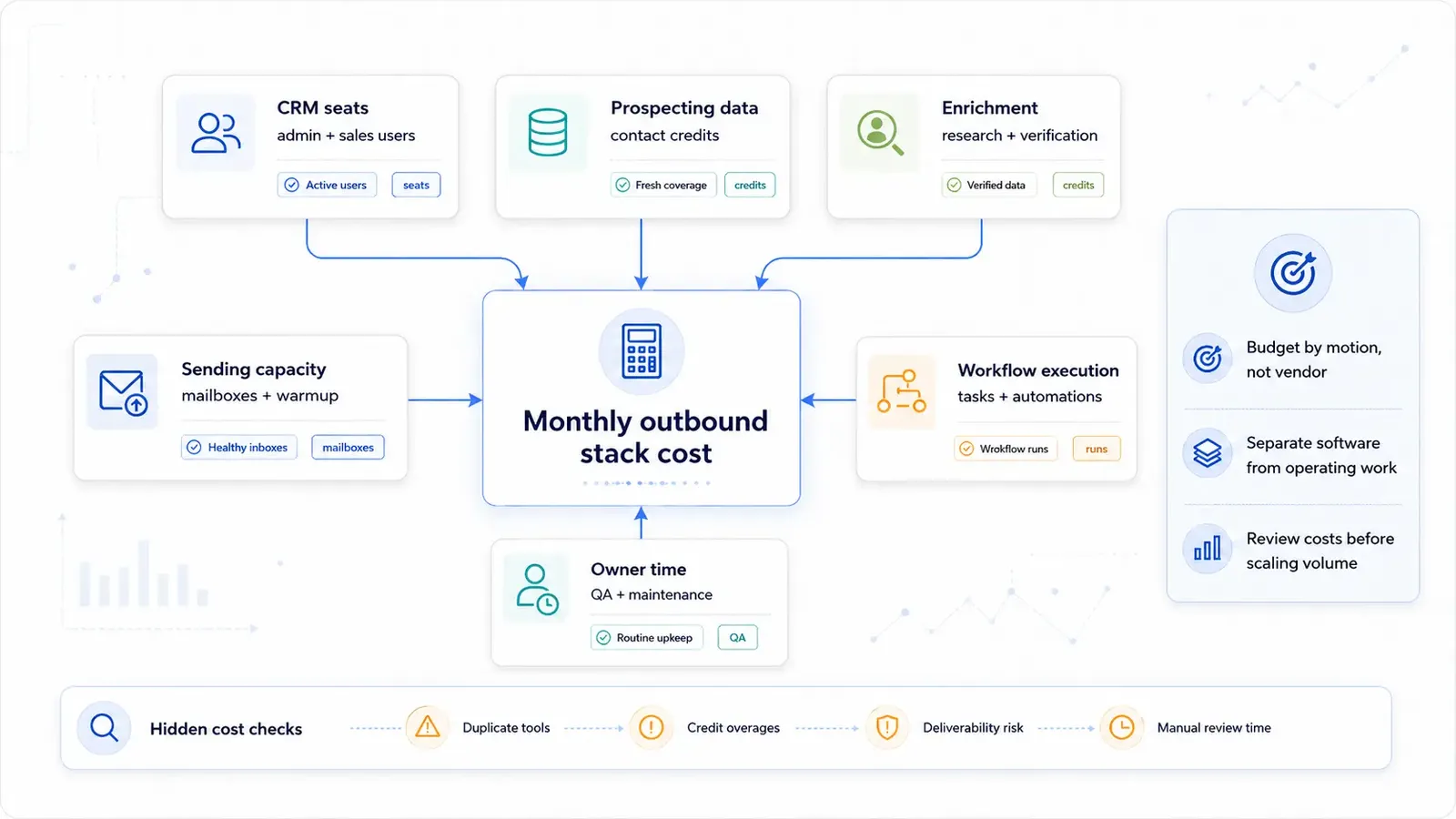
Budget by motion, not by vendor. Start with the number of accounts you will source, how many contacts you need per account, how much context must be added before sending, and how many replies need to flow back into the CRM. Then map those volumes to the tools.
The six cost buckets
A useful first-pass budget separates the stack into buckets. This keeps a low subscription price from hiding high operating cost.
- CRM seats: admin access, sales users, permission work, and the cost of keeping fields trustworthy.
- Prospecting data: contact discovery, email finding, fresh coverage, and list source maintenance.
- Enrichment: research, verification, trigger data, firmographic fields, and selective context added before sending.
- Workflow execution: routing, dedupe checks, approval queues, webhook runs, and handoffs between systems.
- Sending capacity: mailboxes, warmup, inbox monitoring, domain safety, and the sending tool itself.
- Owner time: QA, fixes, campaign review, CRM cleanup, and weekly maintenance.
Use a worksheet before choosing a plan
Open the SMB Outbound Velocity Stack Cost Model as the reference shape, then replace the assumptions with your own volumes. The exact vendor prices should come from official pricing pages during review; the worksheet is for understanding which costs move when your motion changes.
Lean outbound motion
A lean motion usually has one CRM owner, a narrow ICP, light enrichment, a few sending mailboxes, and manual approval before scale. The monthly software total may look manageable, but the founder or operator still spends time reviewing records and fixing edge cases. Count that time. It is part of the cost.
Scaled outbound motion
A scaled motion spends more on data freshness, enrichment runs, workflow control, deliverability monitoring, and CRM cleanup. It also needs clearer ownership because small data errors compound quickly. The spend does not rise only because tools cost more; it rises because the system needs more guardrails.
A simple sizing model
Before buying or upgrading a plan, size the motion in operational units. This avoids a common mistake: comparing tools by headline plan names while ignoring the actions that actually drive cost.
- Accounts per month: how many target accounts enter the workflow after exclusions.
- Contacts per account: how many people you need to identify, verify, and potentially message.
- Enrichment depth: which records need light firmographics versus deeper trigger or research fields.
- Workflow runs: how often records move through dedupe, approval, routing, and CRM update checks.
- Sending load: how many mailboxes, sequences, warmup checks, and reply reviews the motion requires.
- Owner hours: how much weekly time goes into QA, fixes, field cleanup, and campaign review.
What not to count as savings
Automation can reduce repetitive work, but it does not make judgment disappear. If a cheaper setup moves review work from a tool invoice into a founder calendar, the cost did not vanish. It changed shape. The same is true for deliverability repair, CRM cleanup, and campaign diagnosis after a bad batch goes out.
This is why a stack that looks expensive on software can still be cheaper operationally if it prevents duplicate work, bad sends, and manual reconstruction of what happened. The budget should measure the total motion, not the smallest possible subscription set.
Hidden costs to check before scaling
- Duplicate tools: paying for the same contact, enrichment, or sequencing job in multiple products.
- Credit overages: research workflows that run on too many records because filters are loose.
- Deliverability risk: extra domains, mailboxes, monitoring, and repair time after sending too aggressively.
- Manual review time: the work humans still need to do so automation does not send bad records faster.
- CRM cleanup: field repair, dedupe, status hygiene, ownership fixes, and reply reconciliation.
Bottom line
A good outbound stack budget separates subscription cost from operating work. If the budget does not include owner time, it is not the real budget. Build the first version around a reviewed motion, then increase volume only after the cost buckets are visible.